Biuwer Dataprep for data consulting firms and integrators

Standardize recurring client data work instead of rebuilding it project by project

Turn the integration, preparation and validation work you repeat across client projects into visual, maintainable workflows. Reduce scattered scripts and manual tasks, make handovers easier and increase delivery capacity without growing the team at the same rate.

  • Data & Analytics consultancies
  • ERP / CRM integrators
  • Managed data services
  • ERP / CRM
  • Databases
  • APIs
  • Files

Biuwer Dataprep

Reusable client workflows
  • Standardized
  • Monitored
  • Transferable
System categories. Connectivity depends on the interfaces and connectors available for each client environment.

From startups to large organizations, companies trust Biuwer.

  • Cocircular
  • Ediesi
  • Entrii
  • Esave
  • Grupo Alsur
  • Juguettos
  • Neuromobile
  • Renting Finders
  • Vyootrip
  • Grupo Hozono
  • Konery

THE RECURRING DELIVERY CHALLENGE

The same data work keeps returning in slightly different forms

The problem

Every client project introduces another variation of work your team has already solved before. Data preparation and integration ends up distributed across SQL, Power Query, Python, scripts, ETL tools, files and manual steps. As the client base grows, so do unplanned hours, maintenance and dependence on the people who originally built each process.

  • Unplanned integration work erodes project margin
  • Workflow knowledge stays with individual consultants and scripts
  • Maintenance grows with every client and project
How Dataprep helps

Turn recurring delivery patterns into visible, controlled workflows. Use Dataprep to centralize integration and preparation logic, automate recurring execution and monitor what happened, while keeping enough flexibility to adapt each workflow to the client and project.

  • Standardize repeatable integration and preparation patterns
  • Keep workflow logic visible and easier to transfer
  • Automate recurring execution and monitor every run

DELIVERY IMPACT

Increase delivery capacity without multiplying project complexity

Protect project margin

Reduce repetitive preparation, integration and maintenance work that consumes hours outside the original project scope.

Deliver more with the same team

Standardize recurring parts of client projects so additional delivery does not require increasing specialist capacity at the same rate.

Make handovers easier

Keep workflow logic visible and traceable so maintenance does not depend exclusively on the consultant who originally implemented it.

COMMON CLIENT WORKFLOWS

Standardize the data work that appears across projects

Reporting & data warehouse preparation

Prepare recurring data from ERP, CRM, databases, APIs and files before it reaches a warehouse or BI platform.

Example workflow

ERP + CRM + files → normalize → validate → warehouse / BI

ERP & CRM recurring data loads

Automate recurring loads and synchronization processes that continue after an ERP or CRM implementation goes live.

Example workflow

Business systems → map → validate → recurring delivery

Client data normalization & validation

Standardize heterogeneous customer data before dashboards, portals or downstream applications consume it.

Example workflow

Client files + database → map fields → validate → trusted dataset

Managed data services

Operate recurring data preparation and delivery workflows as part of reporting, integration or managed-data services.

Example workflow

Client sources → prepare → schedule → monitored delivery

EXAMPLE WORKFLOW

Standardize recurring client data preparation for reporting

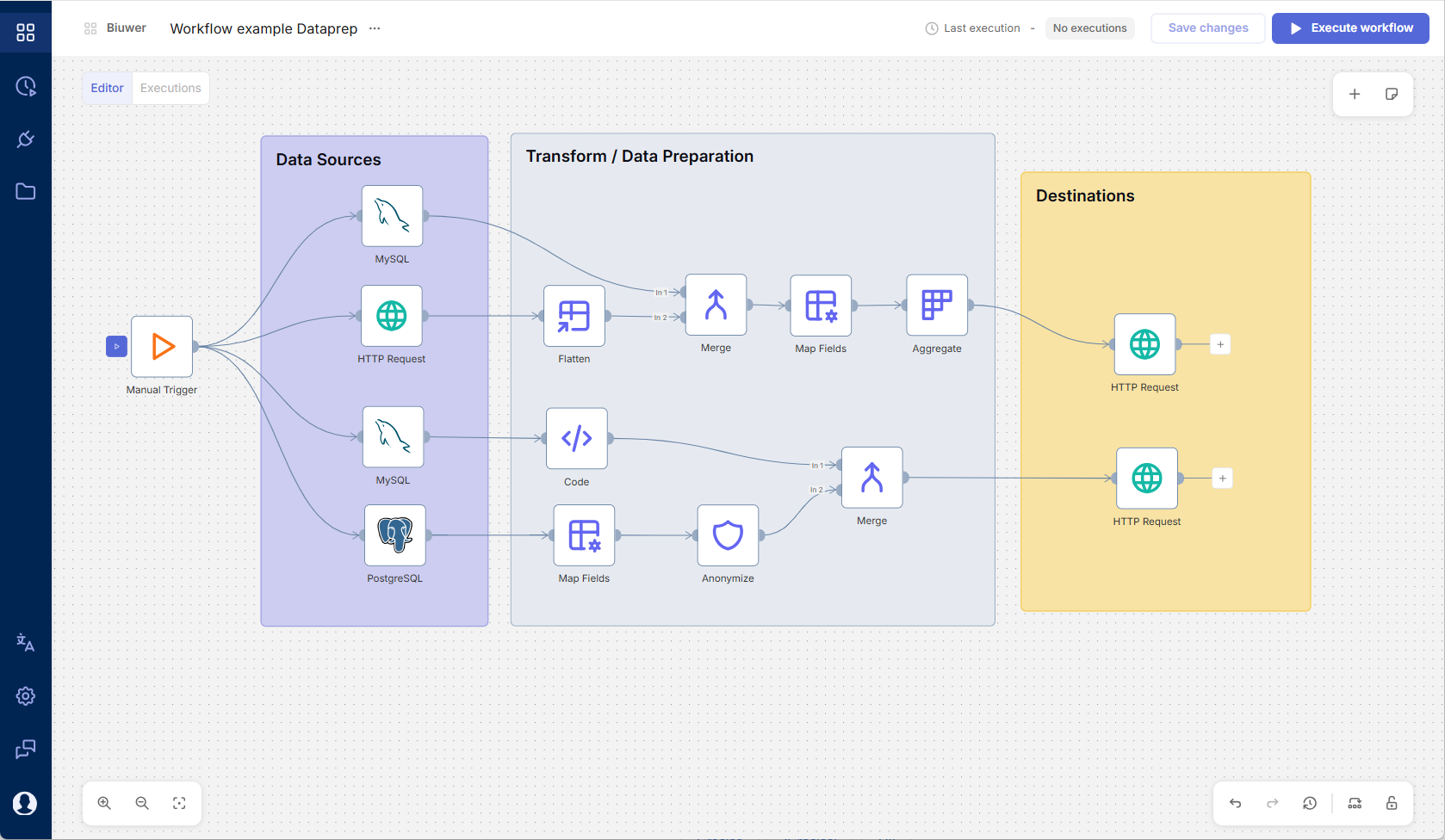
Client projects rarely use exactly the same systems, but the preparation pattern often repeats. Dataprep lets you model the workflow visually and adapt its sources, mappings, rules and destinations to each project.

Example workflow

Adapt the pattern to each project

    • Scheduled trigger
  1. Sources
    • ERP database
    • CRM API
    • Client files
    • Merge
    • Normalize fields
    • Validate
    • Warehouse / BI
Biuwer Dataprep visual workflow editor
Biuwer Dataprep visual workflow editorView full-size editor

WHERE DATAPREP FITS

Built for recurring data work that should not become another custom project

Dataprep fits well when…

  • Similar preparation or integration patterns repeat across clients or projects
  • Delivery currently combines SQL, Power Query, Python, scripts, files or manual work
  • Fixed-scope or recurring projects lose margin to unplanned maintenance
  • Several consultants need to understand and maintain the workflow
  • The team wants to simplify or consolidate parts of its existing data workflow stack
  • The workflow can be solved mainly with Dataprep's standard connectivity, transformation, validation and automation capabilities

Not designed for…

  • One-off migrations with no recurring process afterwards
  • Staff augmentation where your team does not own the delivered data process
  • Strategy-only engagements without technical implementation
  • Highly bespoke projects requiring mostly non-reusable custom development
  • Use cases that depend mainly on capabilities outside Dataprep's current technical scope
  • Pure code-first workflows where a visual operating layer provides no practical value

Questions about Dataprep for consultancies and integrators

How Dataprep supports recurring delivery across client projects.

Can Dataprep replace tools such as Fabric, Data Factory, Airflow or our existing ETL stack?

It can coexist with your existing stack or replace part or all of it when Dataprep covers the workflows and technical requirements involved. Some teams start by using Dataprep for recurring processes that are difficult to justify in the central stack, while others consolidate existing pipelines into Dataprep to simplify development and maintenance. The right approach depends on connectivity, transformations, execution, security and operational requirements.

Can we adapt the same workflow pattern to different clients?

Yes. Dataprep makes recurring integration and preparation logic explicit in visual workflows, allowing each workflow to be adapted to the sources, mappings, validation rules and destinations required by the project.

Can our team still use code when needed?

Yes. Dataprep is visual-first, but workflows can include code when a transformation or project requirement goes beyond the available visual operations.

Which client systems can Dataprep connect to?

Dataprep supports databases, files, FTP/SFTP, REST APIs, OData and other available connectors. The Integrations page contains the current connector catalog and the Source and Destination roles supported by each integration.

How does Dataprep help with handover and maintenance?

Workflow logic remains visible instead of being distributed only across scripts, queries and individual environments. Teams can review the process and its execution history, making recurring workflows easier to understand and maintain.

Can Dataprep work with Biuwer Analytics or another BI platform?

Yes. Dataprep operates independently from Biuwer Analytics. Prepared data can be delivered to Analytics, another BI platform, a database, data warehouse, API or another supported destination.

Can Dataprep run on-premise or inside our infrastructure?

Yes. Dataprep can run in the cloud or on-premise. It also supports cloud workers and local workers, so workflows can process data inside the customer's own infrastructure when required.

Early access

Start with one client workflow your team already repeats

Show us a recurring integration or preparation process that still depends on scripts, files or manual work. We'll review the pattern, its variations across projects and how much of it can be standardized with Dataprep.

Discuss a client workflow
Biuwer

No-code data operations and analytics


2026 © Biuwer Analytics S.L. - All Rights Reserved.

Supported by:

Empresa emergente certificada por ENISA Lanzadera Instituto Fomento Región Murcia (Spain)