Biuwer Dataprep for industrial companies

Turn fragmented industrial data processes into reliable automated workflows

Bring together recurring data from ERP, production, quality, warehouse, maintenance and business systems. Replace manual exports, fragile scripts and repetitive data preparation with visual workflows you can automate, validate and monitor.

  • Process manufacturing
  • Discrete manufacturing
  • Multi-site industrial groups
  • ERP
  • MES
  • WMS
  • QMS

Biuwer Dataprep

Recurring workflow
  • Scheduled
  • Validated
  • Monitored
System categories. Connectivity depends on the interfaces exposed by each system.

From startups to large organizations, companies trust Biuwer.

  • Cocircular
  • Ediesi
  • Entrii
  • Esave
  • Grupo Alsur
  • Juguettos
  • Neuromobile
  • Renting Finders
  • Vyootrip
  • Grupo Hozono
  • Konery

THE RECURRING DATA CHALLENGE

When data falls between systems, manual work fills the gap

The problem

Operational data is spread across systems that were not designed to work as one process. Production, inventory, quality, maintenance, commercial and reporting data may live across ERP, MES, WMS, QMS, databases, local files and other applications. Preparing it for the next operational or analytical step often depends on exports, SQL, scripts, spreadsheets or IT intervention.

  • Manual preparation and reconciliation
  • Changes compete for IT/Data backlog
  • Logic and knowledge remain scattered across people and scripts
How Dataprep helps

Turn the recurring process into a visible, automated data workflow. Use Dataprep to bring data together, apply transformation and validation rules, automate execution and keep every run observable from one visual workspace, without building another custom pipeline for every medium-complexity process.

  • Visualize the complete workflow
  • Standardize transformation and validation logic
  • Automate recurring execution and monitor every run

OPERATIONAL IMPACT

Make recurring data operations easier to run and maintain

Make data available sooner

Automate recurring preparation and validation so operational teams and reporting do not have to wait for manual exports and reconciliation.

Reduce errors and reconciliation

Apply consistent transformation and validation rules before data reaches downstream systems, reports or analytical processes.

Scale workflows without scaling the backlog

Standardize recurring processes across systems, plants or business units without turning every variation into another custom development.

COMMON INDUSTRIAL WORKFLOWS

Start with a recurring process that already consumes time every week

Production & planning

Consolidate production orders, actual production data and business information to keep planning and reporting aligned.

Example workflow

ERP + MES → consolidate → validate → operational dataset

Inventory & warehouses

Reconcile stock, movements and discrepancies across ERP, WMS, warehouses and local files.

Example workflow

ERP + WMS + files → normalize → reconcile → deliver

Quality & maintenance

Prepare production, quality, laboratory, maintenance or asset data for recurring control and analysis.

Example workflow

QMS / CMMS + production → validate → flag exceptions → reporting

Multi-plant consolidation

Standardize heterogeneous data from plants, sites or business units into a consistent structure for corporate use.

Example workflow

Plant systems → map to common model → validate → warehouse / BI

EXAMPLE WORKFLOW

Automate daily production and inventory consolidation

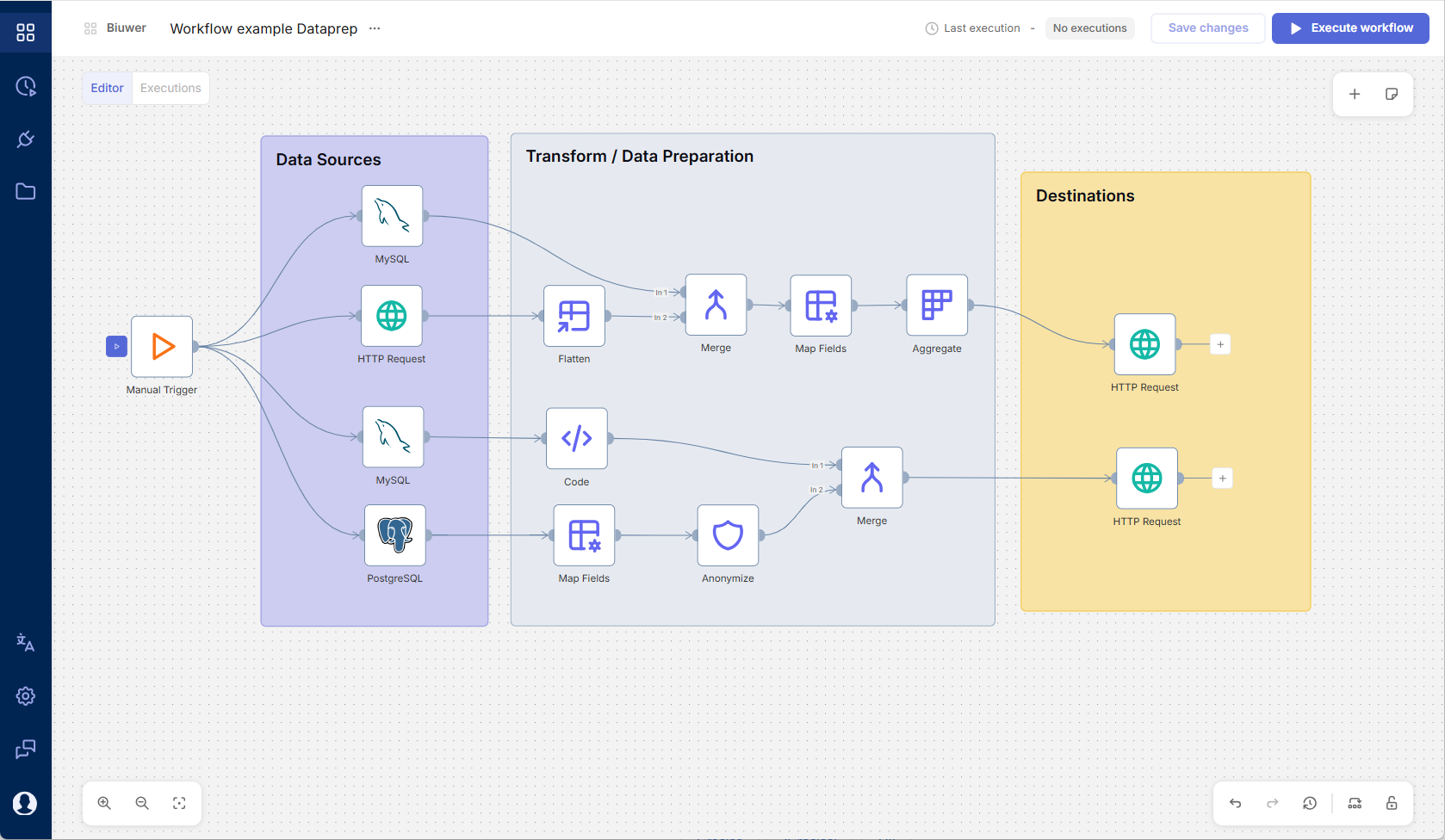
Every industrial process is different. Dataprep lets you combine triggers, sources, transformations, validation and destinations in the sequence the workflow requires.

Example workflow

Built around your data process

    • Scheduled trigger
  1. Sources
    • ERP
    • MES
    • WMS files
    • Merge
    • Map master data
    • Validate
    • Warehouse / BI
Biuwer Dataprep visual workflow editor
Biuwer Dataprep visual workflow editorView full-size editor

WHERE DATAPREP FITS

Designed for recurring data operations between business systems

Dataprep fits well when…

  • A recurring workflow spans several systems, files or data formats
  • The process still depends on scripts, spreadsheets or manual intervention
  • Rules change often enough that custom maintenance becomes costly
  • IT/Data has more recurring requests than it can industrialize quickly
  • Several plants, sites or business units need similar data processes
  • Success can be measured in hours saved, data availability, incidents or backlog

Not designed for…

  • Real-time industrial control
  • Critical SCADA or OT processes
  • High-frequency telemetry or streaming
  • Safety-critical automation
  • One-off migrations with no recurring workflow
  • Use cases that depend mainly on capabilities outside Dataprep's current technical scope

Questions about Dataprep for industrial data operations

How Dataprep fits alongside the systems and architecture you already use.

Can Dataprep coexist with or replace parts of our current integration stack?

Yes. Dataprep can coexist with existing ERP, MES, WMS and integration platforms, and can replace recurring data preparation, integration or automation workflows when its current capabilities cover the requirements. It is not intended to replace the core transactional or operational functionality of ERP, MES, WMS or other business systems.

How does Dataprep connect to industrial systems?

Dataprep connects through the interfaces exposed by each system, such as databases, REST APIs, OData, files and FTP/SFTP. The exact architecture depends on the system and network environment, so connectivity and security requirements should be reviewed early for industrial use cases.

Is Dataprep designed for real-time industrial control?

No. Dataprep focuses on recurring data operations. It is not intended to replace SCADA, real-time OT control, safety-critical systems or high-frequency telemetry infrastructure.

Can we use Dataprep across several plants or business units?

Yes, when the processes share repeatable data preparation and validation patterns. Dataprep makes workflow logic visible and easier to standardize while allowing each workflow to adapt to its systems and data.

Can we monitor what happened in each workflow?

Yes. Dataprep keeps executions visible so teams can review run status and execution history and identify workflows or steps that require attention.

Can Dataprep be used with Biuwer Analytics or our existing BI platform?

Yes. Biuwer Dataprep and Biuwer Analytics can be used independently. Prepared data can also be delivered to Analytics, an existing BI platform, a database, data warehouse, API or another supported destination.

Can Dataprep run on-premise or inside our infrastructure?

Yes. Dataprep can run in the cloud or on-premise. It also supports cloud workers and local workers, so workflows can process data inside the customer's own infrastructure when required.

Early access

Start with one recurring industrial data workflow

Show us a process that still depends on exports, scripts, files or IT backlog. We'll review its systems, logic, frequency and expected outcome and assess whether it fits Dataprep early access.

Discuss an industrial workflow
Biuwer

No-code data operations and analytics


2026 © Biuwer Analytics S.L. - All Rights Reserved.

Supported by:

Empresa emergente certificada por ENISA Lanzadera Instituto Fomento Región Murcia (Spain)